
Video Podcast Studio Layout: Technical Guide to Camera Placement & Geometry
Hey Podcast Fam,
You've invested in good equipment. You've nailed your audio. Your content is strong.
But if your studio geometry is off, your viewers will feel it — even if they can't name it. Something will seem slightly disconnected about your show. The host seems distracted. The conversation feels distant. The energy doesn't quite land.
Most of the time, that's not a content problem. It's a spatial one.
This guide walks you through how to audit and optimize your studio layout for video podcasting — whether you're running a solo show, a co-hosted format, or bringing in regular guests.
What Is Studio Geometry?
Studio geometry is the spatial relationship between you, your guest, your cameras, and your eyeline. When these elements are aligned, on-camera presence feels natural and effortless. When they're misaligned, even a skilled host can look distracted, uncomfortable, or disconnected — without knowing why.
The goal is simple: your setup should make it easy to maintain a natural visual connection with your viewer at all times, regardless of what else is happening in the room.
The Four Most Common Layout Problems
1. The Laptop Lean
This is the most common issue in home and studio setups alike. Your notes, questions, or rundown live on a laptop or monitor positioned to your left or right. Every time you check them, your eyes — and often your whole head — swing away from the camera line.
To the viewer, this reads as distraction or disengagement, even when you're completely focused on the conversation.
- The Fix: Move your notes directly in front of you, positioned just below your primary camera line. When you need to glance down, your face stays oriented toward the lens. The movement becomes nearly invisible on screen.
2. The Producer Glance
If you work with a production team, this one is easy to fall into. A producer waves from behind the glass, holds up a time card, or gestures something mid-conversation — and your eyes dart off-camera right in the middle of a great moment.
For the viewer, that break in eye contact signals that something more important than them just happened in the room. It pulls them out of the conversation instantly.
- The Fix: Establish a non-verbal communication system with your team before every session. A thumbs up for "you're good," a simple hand signal for "two minutes left," or a notepad held in a fixed spot you can glance at without turning your head. Keep it consistent so it becomes second nature on both sides of the glass.
3. The "Too Low" Lens
A camera placed below your eye line forces you to look slightly downward throughout the recording. It's a subtle angle, but it has a compounding effect over the course of an episode — creating visual distance, an unflattering perspective, and a posture that can read as disengaged.
This is especially common when hosts use laptops with built-in webcams, or place cameras directly on a desk without adjusting for height.
- The Fix: Mount your primary camera at exact eye level. The lens should feel like a person sitting directly across from you — not a device sitting on a table. When you look into it, you should feel like you're making eye contact, not looking down at something.
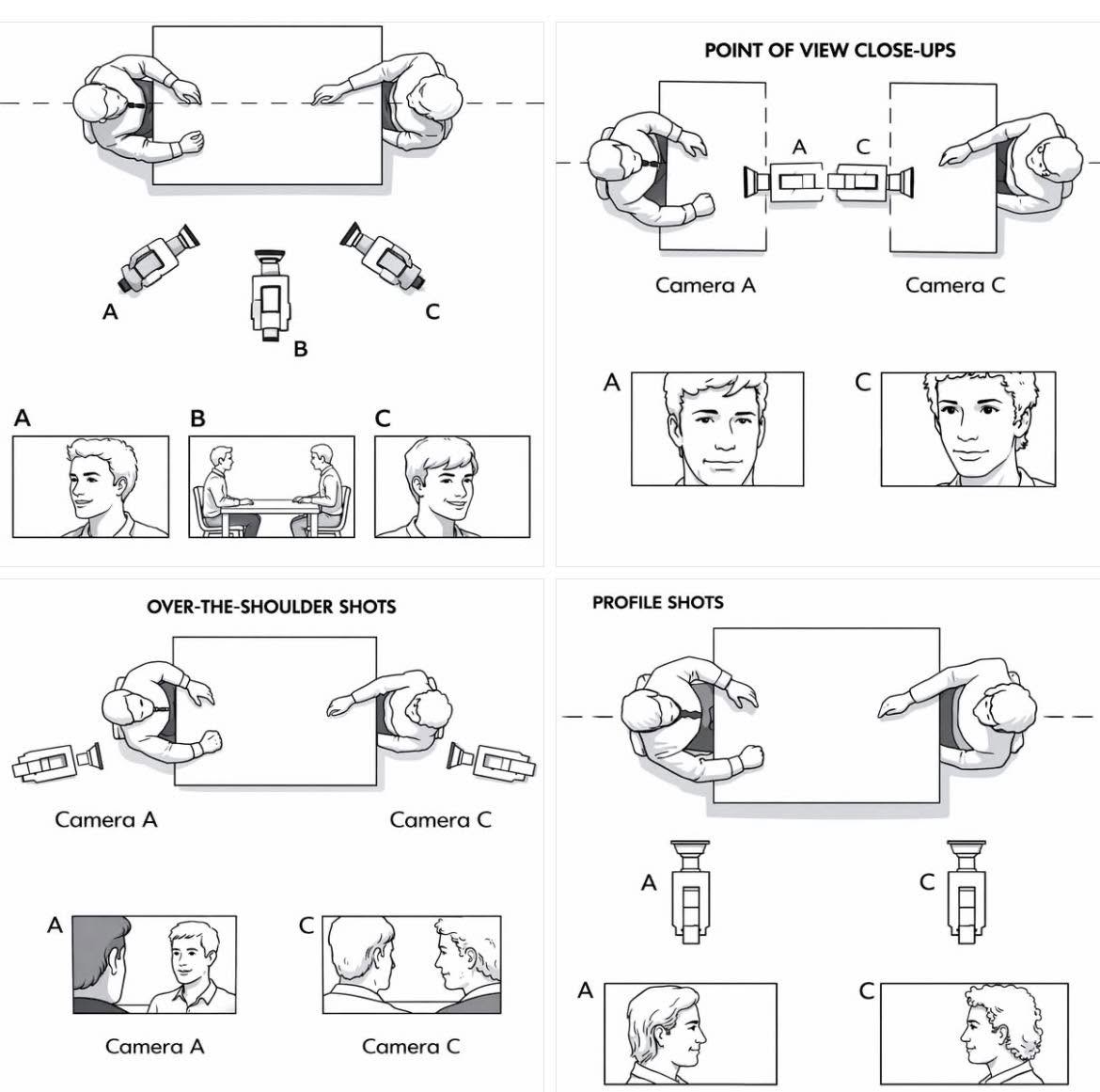
4. The Wide Guest Triangle
This issue is specific to interview formats. When your guest is seated too far away from your primary camera line, the profile angle becomes too wide. If you turn your entire head across the room to look at them, your dedicated solo camera loses your face and ends up capturing the back of your head or an unflattering profile.
- The Fix: Pull the guest's chair closer to the camera line. The tighter the physical triangle between you, you guest, and the lenses, the less drastic your head turn needs to be. This allows you to maintain natural eye contact with your guest while keeping your face fully visible to your solo camera.
Source: Facebook ECamm Community
How to Audit Your Own Setup
Here's a simple self-check you can run before your next recording:
- Step 1 — Record a two-minute test: Sit in your normal recording position and talk through your show intro as if you're live. Don't adjust anything yet. Just record.
- Step 2 — Watch it back on mute: Remove the audio from the equation entirely. Watch only your eyes, your head movement, and your posture. Notice where your gaze travels and how often it leaves the camera line.
- Step 3 — Map your problem areas: Are your eyes drifting left or right to a screen? Are you looking slightly downward? Are there moments where you turn your head more than a few degrees? Each one of those is a geometry problem with a fixable cause.
- Step 4 — Make one adjustment at a time: Move your notes in-line. Raise your camera. Reposition your guest. Record another two-minute test. Compare. Geometry work is iterative — small adjustments compound quickly.
The Baseline Setup That Works
If you're starting from scratch or doing a full reset, here's a layout that works reliably across solo, co-hosted, and guest formats:
- Primary camera (Your Solo Cam): Placed directly along your sightline to the guest, positioned as close to the guest's shoulder line as possible.
- Notes or prompter: Directly below the primary camera, within a few inches of the lens.
- Guest seating: Positioned across from you, but angled slightly inward to narrow the camera shooting triangle.
- Secondary cameras (if used): Placed at angles that don't require you to turn your head more than 30 degrees.
- Production team: Positioned behind or beside a monitor, never in your direct sightline during recording.
This isn't a rigid formula — every studio is different. But these five anchors give you a strong foundation to build from.
A Note on Consistency
Studio geometry isn't a one-time fix. Equipment moves. Guests sit in different spots. New gear gets added. Build a quick pre-show checklist — camera height, notes position, guest placement — so you're resetting to your optimized layout every single session, not just when something feels off.
The hosts who look most natural and commanding on camera aren't chapters ahead in hosting experience. They're often just the most consistent about their spatial setup.
Ready to Record in a Studio Built for This?
If you'd rather skip the trial and error, our studio sessions are designed specifically for video podcast production. Camera angles, lighting grids, and sightlines are all dialed in before you arrive — solo setups, guest formats, and multi-cam configurations included.
Session bundles start at $200 per session.
